
Shopify migration services for stores that cannot afford to lose a single order
By Talha AbidFiverr Level 2, 65 five-star reviewsUpwork Top Rated, 15 five-star ratings, 100% job success200+ builds since 2019Updated
I am Talha Abid, a freelance Shopify developer in Lahore with 40+ Shopify stores built, working US hours for US clients since 2019. Moving a store is not just exporting a CSV. Product variants, customer accounts, order history, SEO redirects and the theme all have to arrive intact. I migrate stores from WooCommerce, Wix, Squarespace and BigCommerce to Shopify, keep the URLs ranking, and hand you a store that is ready to sell on launch day.
- Starts at
- $599
- Quote
- Fixed, within one business day
- Support
- 30 days of fixes included
- Platforms
- ShopifyWooCommerceWixSquarespaceBigCommerce
- Prices reviewed
Fixed-price options.
Named packages with the price each starts at, what it includes and how long it takes. Anything outside them gets a fixed quote within one business day.
Shopify migration
Products, customers, orders and redirects moved from WooCommerce, Wix or Squarespace to Shopify without losing SEO or taking the store down.
- Pre-migration audit and data map
- Product, collection, customer and order migration
- 301 redirect map for every URL
- Theme setup, payments, shipping, taxes, launch-day checks and 30 days of fixes
- From
- $599
- Delivery
- 1 to 2 weeks for stores under 1,000 products
What does Shopify Migration include?
Shopify migration is the careful move of a working store from WooCommerce, Wix, Squarespace or BigCommerce onto Shopify. It is for owners with 50 to 5,000 products who cannot risk lost orders or lost Google traffic. I move products, customers and order history, set up the theme, and redirect every old URL. The old store is switched off only after the new one passes checks.
A good fit if
- Stores with 50 to 5,000 products moving from WooCommerce, Wix, Squarespace or BigCommerce
- Owners whose Google traffic matters and who need every old URL redirected
- Businesses worn out by plugin updates and hosting problems on their current platform
Probably not for you if
- Enterprise Magento stores with ERP integrations and very large catalogs
- Brand new stores with nothing to move, which fit my Shopify store design service
- Owners who want the move done in a day or two with no verification step
What changes for your business?
- 01
Products, variants, images, customers and orders moved with nothing missing
- 02
Old URLs redirected one to one, so rankings and backlinks survive
- 03
A Shopify theme set up to match or improve your current design
The part most migrations get wrong
Redirects. Every old product and collection URL must point at its new Shopify equivalent, or your Google rankings and every link you have ever earned go to a 404 page. I map every URL before the move and verify the redirects after.
Sized for real businesses
The big migration agencies focus on Magento enterprises with six-figure budgets. I work with stores that have 50 to 5,000 products and need it done carefully at a fair price.
What does Shopify Migration cost, and what is in the quote?
Projects start at $599. Every item below is included. Nothing becomes an upsell later.
- Pre-migration audit and data map
- Product, collection, customer and order migration
- 301 redirect map for every URL
- Theme setup, navigation, pages and policies
- Payments, shipping, taxes and app configuration
- Launch-day checks and 30 days of fixes
How a WooCommerce to Shopify migration runs
I start with an audit of the old store: product count, variable products, customer records, order history and every URL Google has indexed. That becomes a data map showing where each field lands in Shopify. WooCommerce attributes and variations become Shopify options and variants. Product categories become collections. Custom fields with no Shopify equivalent go into metafields. Wix, Squarespace and BigCommerce follow the same steps with different export files.
The product and customer import runs by CSV or a tool such as Matrixify. The choice depends on catalog size and how much order history you keep. Shopify's own importer handles products and customers, while orders need an app or the API. I import into a fresh store and spot-check variants, prices, images and inventory against the source. Then I set up the theme, configure payments, shipping and taxes, and place test orders before the domain moves.
Migrate to Shopify without losing SEO
Shopify uses fixed URL patterns. Products live under /products/, collections under /collections/ and pages under /pages/. Your old WooCommerce or Wix addresses cannot be kept, so each one needs a 301 redirect to its new home. I crawl the old site, pull the top pages from Search Console, and build a one-to-one redirect map in a spreadsheet you can review.
The map goes into Shopify's URL redirects before launch. I also carry over page titles, meta descriptions, image alt text and on-page copy, since a redirect to a thinner page still loses ground. After the domain switches, I recrawl the old URL list to confirm every address returns a 301 to the right page. Then I submit the new sitemap in Search Console and watch for 404 errors. Nobody can promise rankings hold through a platform change, but this removes the usual causes of a drop.
What goes wrong in rushed store migrations
The usual story is an automated migration app run once, with nobody checking the result. Variants arrive as separate products. Product descriptions carry leftover shortcodes from the old page builder. Images still point at the old server and break when that hosting is canceled. Redirects were skipped, so every old Google result lands on a 404 page.
When I am called in after a launch like that, I fix things in order of lost revenue. Redirects come first, because every day without them costs traffic. Then broken images, then variant structure, then description cleanup. Doing this before launch is cheaper, which is why I keep the old store live until the new one is verified. Migrations start at $599. The quote depends on product count, order history and how much theme work is needed.
What clients say about this kind of work.
Every review is public on the platform it was left on. 80 five-star reviews across Fiverr and Upwork, 65 of them on Fiverr.
“Don’t bother looking elsewhere. Talha is the individual you need to hire. The most dedicated person on this whole platform.”
“Awesome work. No complaints, easy to work with, high quality attention to detail.”
Related work you can open.
Live sites and screenshots. More examples on request, including builds inside client accounts.

Shopify / beauty & wellness
Airlusions
airlusionscandles.com

Shopify
Samreen’s Vanity
samreensvanity.com

Shopify / ecommerce
Drink The Pathfinder
drinkthepathfinder.com

Shopify / home services
NAF Flowers
nafflowers.ae
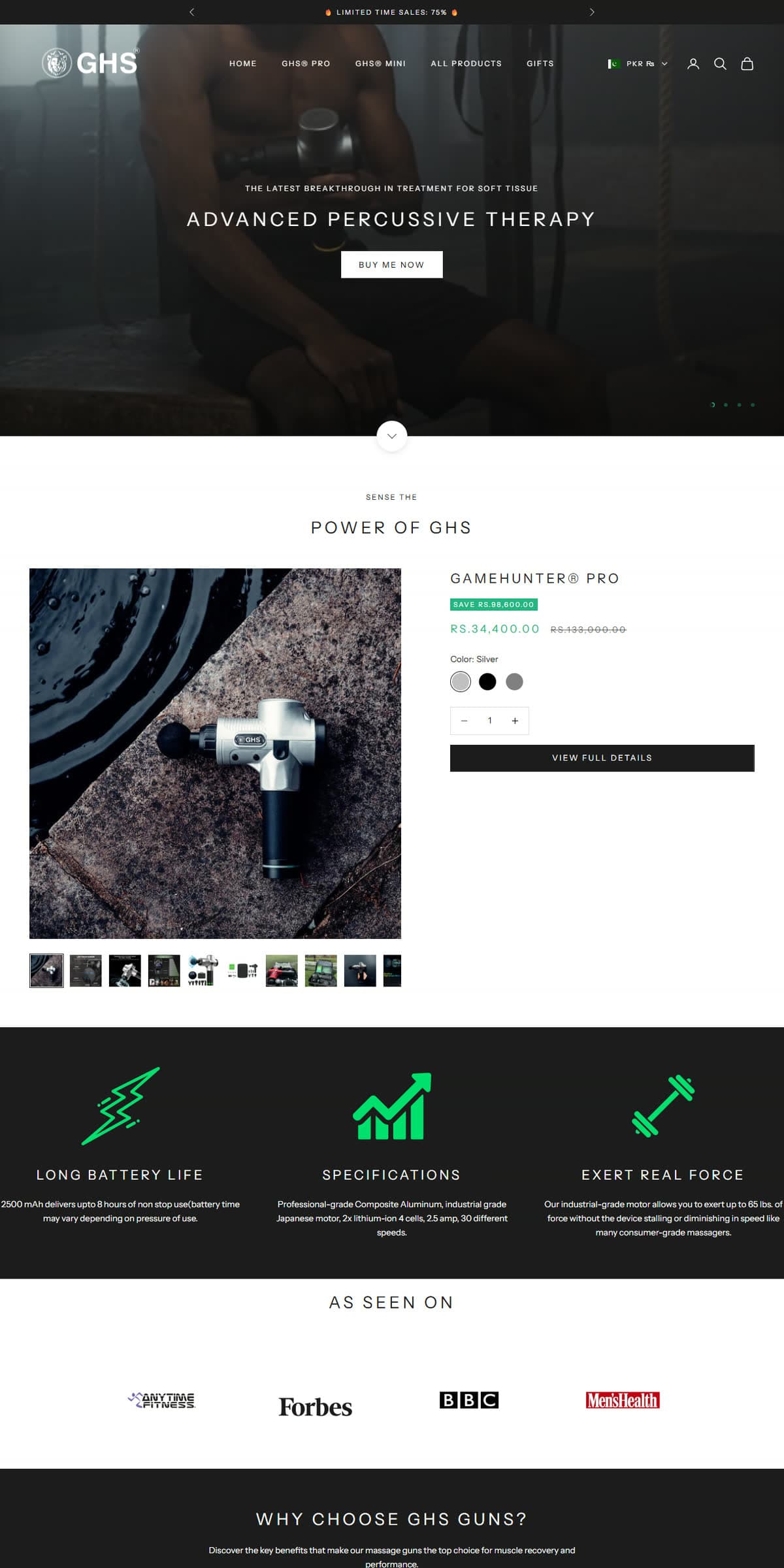
Shopify / ecommerce
gamehunterstore.com
Body massage therapy gun

Shopify / ecommerce
sportcove.ae
Shoes store
Read before you buy.
Guides written from the same client work, with the numbers I use to quote.
Shopify Migration: the questions buyers ask.
Which platforms can you migrate to Shopify?
WooCommerce, Wix, Squarespace, BigCommerce, Magento 2 for smaller catalogues, and custom-coded stores.
Will my customers have to create new accounts?
Customer records move over. Passwords cannot be exported from any platform, so customers set a new password once through an invite email I send on launch.
How long does a migration take?
One to two weeks for stores under 1,000 products. The old store stays live until the new one is verified, so there is no downtime.
Will I lose my Google rankings if I move to Shopify?
Not if redirects and content are handled properly, though nobody can guarantee it. URLs always change on Shopify, so I map each old URL to its new one with a 301 redirect. I also carry over titles, descriptions and copy, and verify everything after launch. Some short-term movement is normal after any platform change. Skipped redirects are the main cause of lasting drops.
Can you migrate my order history to Shopify?
Yes. Shopify's built-in importer covers products and customers only, so I bring orders in with a tool such as Matrixify or through the API. Imported orders appear in the admin and attach to the right customer record. Tell me how far back you need. Several years of history takes longer to import, and some owners choose to keep only recent years.
What do you need from me to start a Shopify migration?
I need admin access to the old store, a Shopify store I can work in, and access to your domain's DNS. Search Console access helps if you have it. You stay the owner of the Shopify store, and I work through collaborator access. I also need a list of the plugins the old store depends on, such as subscriptions or reviews. That lets me plan their Shopify replacements before moving data.
What happens to orders placed during the migration?
Nothing is lost. The old store keeps taking orders until launch day. Right before the domain switches, I run a final sync. It brings over new customers, new orders and inventory changes made since the first import. The switch itself is a DNS change, which I schedule for your quietest sales hours. I work US hours, so I am online while it happens.
Related services.
- EcommerceShopify Store Design
- WebsitesWebsite Migration
- EcommerceShopify SEO
Ready to start? Send the brief.
Send a few lines about the project. You get a fixed price and a timeline within one business day, and no follow-up sequence if it is not a fit.