
How Much Does a Website Redesign Cost in 2026?
Website redesign cost in 2026: my real price ranges, what moves a quote up or down, signs you need a redesign, and how to keep your Google rankings.
By Talha Abid9 min read
A small business website redesign costs $599 to $2,500 with me in 2026 for a site of 5 to 12 pages, quoted as a fixed price after an audit. Larger sites and online stores are priced once I have seen them. Page count, content, integrations, platform changes and SEO preservation move the number the most.
Most redesign quotes are confusing because they hide what is being bought. I have delivered 200+ projects since 2019, mostly for US small businesses. Below are my own prices and the reasons a quote moves up or down.
Key takeaways
- My redesigns for 5 to 12 page business sites run $599 to $2,500, fixed before work starts.
- The biggest price drivers are custom page designs, who supplies the content, integrations and a platform change.
- You can safely skip a new logo, heavy animation and pages nobody visits.
- Never skip redirects, mobile layout, speed and tracking.
- A redesign should not cost you rankings. Map every URL, set 301 redirects, keep what ranks, and crawl the site before and after launch.
My website redesign prices for 2026
These are my own price ranges, the same ones listed on my service pages. For context, the ranges vendors publish run much wider, and they are vendor guides rather than independent surveys: Wix's guide puts a redesign at $2,000 to $20,000 or more. My quotes sit at the lower end of those ranges because there is no agency overhead inside them.
| Project | My price |
|---|---|
| Website audit before a redesign | From $149 |
| Single landing page | From $249 |
| Website redesign services, small business site of 5 to 12 pages | $599 to $2,500 |
| WordPress build or redesign (Elementor, Divi or custom theme) | From $449 |
| Webflow build or redesign | From $299 per page |
| Shopify store design or redesign | From $599 |
| Platform migration, for example Wix to WordPress | From $499 |
| Larger sites and ecommerce stores | Quoted after the audit |
| Care plan after launch | From $149 a month, $199 for Shopify and WooCommerce stores |
Every quote is fixed before work starts.
In the quotes clients have shared with me, an agency usually charges more for the same scope, because its quote carries account management, meetings and margin on top of the build. With a freelancer, the person you message is the person who builds.
What drives the price up or down?
| Factor | Pushes the price up | Keeps the price down |
|---|---|---|
| Page designs | Every page designed from scratch | A few templates reused across many pages |
| Brand | A new brand invented during the project | Your existing logo, colors and fonts |
| Content | I write the copy and source the images | You supply final copy and photos |
| Integrations | CRM, booking, payments, member areas | A contact form and a phone number |
| Platform | Moving to a new platform | Staying where you are |
| SEO history | Hundreds of ranking URLs to map | A small site with a handful of URLs |
| Decisions | Several stakeholders and rounds of revisions | One decision maker and a written brief |
Four of these rows move a quote the most.
Page count and page types. A page that follows a template costs a fraction of a page designed from scratch. Ten service pages on one template cost less than three fully custom pages.
Content. If you supply the copy and images, the price drops. If I have to write copy, edit photos and find stock images, the quote goes up to cover that time.
Migration. Moving platforms means rebuilding every page and mapping every URL. My website migration service starts at $499. If you are weighing platforms, read my Webflow vs WordPress comparison first.
SEO preservation. Auditing existing rankings, keeping URLs, writing redirects and resubmitting sitemaps is a task of its own. Skipping it is the most expensive mistake on this list.
What are the signs you need a redesign?
- The site is slow on a phone. If pages take several seconds to appear on mobile data, visitors leave before they read a word.
- It was designed for desktop. Tiny text, buttons that are hard to tap and forms that fight the keyboard all cost you inquiries.
- Traffic comes in but inquiries do not. People find you and then cannot work out what you do or how to reach you.
- You cannot edit it yourself. Every text change needs a developer, so the site goes stale.
- The platform has hit its limit. You need booking, a store or a CRM connection that your current builder cannot handle.
- The business has changed. The site no longer reflects your services, locations or brand.
- It keeps breaking. Updates take down forms, or the site has been hacked before.
- It looks dated next to competitors. An old design makes buyers wonder if you are still in business.
One or two of these can often be fixed without a full redesign. A website audit from $149 tells you which problems are real and which fixes come first.
What can you skip to save money?
- A brand new logo, unless the current one is a real problem.
- Custom illustrations and animations on every section. One or two well-placed ones do more.
- Dozens of pages nobody visits. Check your analytics and cut, merge or redirect what has no traffic.
- A multi-month discovery process. For a small business site, a one-hour call and a written brief is enough.
What should you never skip?
- Mobile-first layout. Design the phone version first, with tap-to-call in the header and short forms.
- Speed. A redesign that loads slower than the old site is a downgrade.
- Redirects. Every old URL must point to its new equivalent, or you lose rankings and backlinks.
- Tracking. Analytics, conversion events and call tracking go in before launch.
- A clear call to action on every page. The point of the redesign is more inquiries.
How do you redesign without losing SEO rankings?
Redesigns lose traffic when URLs change without redirects, when page titles get rewritten without thought, or when content that ranked gets deleted. This is the process I follow, and it matches Google's guidance for site moves with URL changes.
- Crawl the old site before touching anything. I run a crawler such as Screaming Frog to list every URL, title, heading and canonical tag. I also export the ranking pages and queries from Search Console, plus the pages that have backlinks. That file is the baseline.
- Build the URL map. Every old URL goes in a spreadsheet next to its new address. Keep the same URL wherever you can. An unchanged URL needs no redirect and carries no risk.
- Set 301 redirects one to one. A 301 tells Google the move is permanent, so the old page's signals carry over to the new one, as Google's redirect documentation describes. Point each old URL at its closest equivalent. Avoid redirect chains, and avoid sending everything to the home page.
- Keep the titles and content that rank. If a page already ranks, carry over its title tag, headings, body copy, internal links, image alt text and schema. Improve the design around it. Rewrite only the pages that were not performing.
- Keep the staging site out of Google. The new build stays blocked from indexing while it is in progress. At launch, check that the block is gone. A leftover noindex tag is a classic way to vanish from search.
- Crawl again after launch. Run the same crawl on the new site and compare it with the baseline. Look for 404 errors, redirects that return the wrong status code, missing titles and wrong canonical tags. Test every line of the redirect map.
- Resubmit and monitor. Submit the new sitemap in Search Console and watch the indexing and performance reports for a month. Some movement in the first weeks is normal. Leave the redirects in place for at least a year, the minimum Google recommends in its site-move guidance. I leave them permanently.
Done properly, traffic should hold through the launch. Any growth afterwards comes from the speed, content and link work that follows, not from the redesign itself.
A worked example
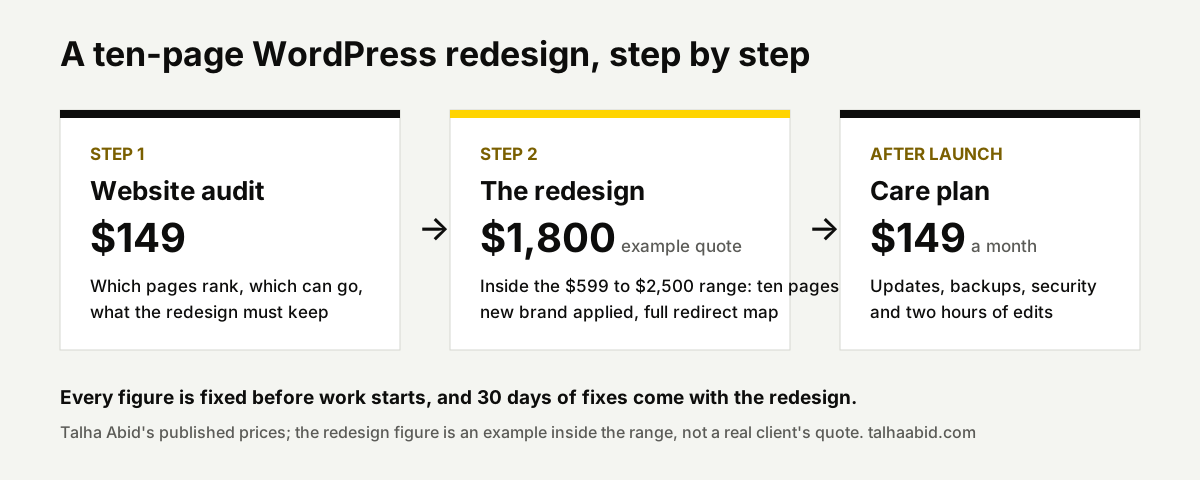
Take a home-service business with a ten-page WordPress site: dated design, slow on phones, copy that still reads well. The owner supplies the photos and keeps the platform. The audit comes first at $149 and tells us which pages rank and which can go. The redesign lands inside the $599 to $2,500 range; ten pages, a fresh brand applied throughout and the full redirect map put it in the upper half, so for this example call the quote $1,800. After launch, a care plan at $149 a month covers updates, backups and two hours of edits. That is the whole cost, fixed before work starts.
For context on the care plan, GoDaddy's guide (April 2026) puts small-business website maintenance at $50 to $500 a month. Mine sits inside that range and includes the edit hours, which the cheaper plans usually do not.
How long does a website redesign take?
Two to four weeks for most business sites. An audit on its own takes five working days.
The biggest variable is how quickly content and approvals come back. The fastest projects have one decision maker and final copy ready before design starts.
What the fixed quote includes
My website redesign service starts at $599 for small business sites. It is quoted as a fixed price after an audit of your current site.
The quote includes the redirect map, title and schema migration, speed work, mobile-first layouts and 30 days of post-launch fixes.
I redesign on WordPress, Webflow, Shopify and GoHighLevel. If the platform is the problem, I will say so before quoting. If the site lives inside GoHighLevel, the subscription is a separate cost; my GoHighLevel pricing guide breaks it down.
Send me your current site through the contact form. I will tell you what it would cost and how long it would take.
Frequently asked questions
Is it cheaper to redesign a website or build a new one?
On the same platform, a redesign is usually cheaper, because the content, structure and hosting already exist and only the design layer changes. When the platform itself is the problem, a rebuild on a better one can cost about the same and saves paying twice. Either way, carry over your URLs and the content that ranks. Starting from zero throws them away.
How often should a small business redesign its website?
There is no fixed schedule. Redesign when the site stops doing its job: it loads slowly, it looks dated next to competitors, you cannot edit it, or inquiries have dropped while traffic held steady. A well-built site can last for years with small updates. Regular maintenance and occasional page refreshes cost less than rebuilding everything on a calendar.
Can I redesign my website in stages to spread the cost?
Yes. Start with the pages that bring in business: the home page, the main service pages and the contact page. Build them as templates, launch, and then roll the design out to the remaining pages in later rounds. Each stage has its own fixed price, and the most valuable pages improve first.
Should I change platforms during a redesign?
Only when the platform is the limit. If your current builder cannot do what the business needs, or upkeep takes too much time, a redesign is the natural moment to move, since every page is being rebuilt anyway. A migration adds the work of rebuilding content and mapping every URL. If the platform is fine, keep it and put the budget into design and content.