
Webflow vs WordPress for a Small Business Website in 2026
Webflow fits marketing sites a team edits without updates; WordPress fits sites that run on plugins, like stores and memberships. Cost, speed, SEO and upkeep compared by a developer on both.
By Talha Abid8 min read
Pick Webflow if you want a fast, design-led marketing site with a blog and no updates or security patches to manage. Pick WordPress if you need WooCommerce, memberships, heavy plugin features or the lowest possible hosting bill. For most small service businesses I recommend Webflow, and I build on both platforms every month.
I have no stake in either one. I have delivered 200+ projects since 2019, including 45+ WordPress builds you can open on my work page and a steady run of Webflow work for US marketing teams. The right answer depends on what the site has to do and who will edit it after launch.
Key takeaways
- Webflow suits marketing sites: pages, a blog, a few content collections, and a team that never wants to think about updates.
- WordPress suits sites that depend on plugins: stores, memberships, directories, bookings and complex forms.
- Both rank well on Google. Rankings come from content, speed and links, whichever builder you use.
- Running costs end up close for a standard business site. WordPress has the lower floor, and Webflow has fewer surprise bills.
- You can move between them later, as long as someone maps every URL and sets redirects.
How do Webflow and WordPress compare at a glance?
| Factor | Webflow | WordPress |
|---|---|---|
| What it is | A hosted visual site builder with its own CMS | Free open-source software you host yourself |
| Platform cost | A monthly site plan per site, hosting included | Hosting, a domain, plus any premium theme, builder or plugins |
| Speed | Fast by default on built-in CDN hosting | Depends on hosting, caching and how many plugins run |
| SEO controls | Built in: titles, descriptions, Open Graph, canonicals, 301 redirects, sitemap | Added through a plugin such as Yoast or Rank Math, and very flexible |
| Editing after launch | A restricted editing view that protects the layout | Full control from the dashboard or a page builder, and easier to break |
| Maintenance | Handled by the platform | Core, theme and plugin updates, backups and security are yours |
| Ecommerce | Fine for small catalogs | WooCommerce handles large catalogs, subscriptions and bookings |
| Extending it | Native features, custom code embeds and apps | Tens of thousands of plugins |
| Portability | Code export leaves the CMS content behind | Move the whole site to any host |
| My build price | From $299 per page | From $449 per project |
Everything below is the reasoning behind that table.
Which is cheaper, Webflow or WordPress?
Webflow charges a site plan for each site, and hosting is part of it. When I checked Webflow's pricing page on 25 September 2026, the Basic plan for a site without a CMS was $15 a month billed yearly, and the Premium plan with the CMS was $25 a month billed yearly. A site with a blog or any other CMS collection needs the Premium plan. Webflow changes its plans and prices from time to time, so check the page before you budget.
WordPress is free, open-source software. You pay for hosting, which runs from cheap shared plans to pricier managed hosts. Most business sites also carry a yearly license for a page builder such as Elementor Pro and a few premium plugins.
For a standard business site, the two end up in a similar range. WordPress wins on the absolute floor if you are happy on budget hosting. It loses that lead once paid plugins pile up.
The cost people forget is upkeep. A WordPress site needs someone to run updates and backups. If that is a paid care plan, add it to the comparison. My maintenance plans start at $149 a month.
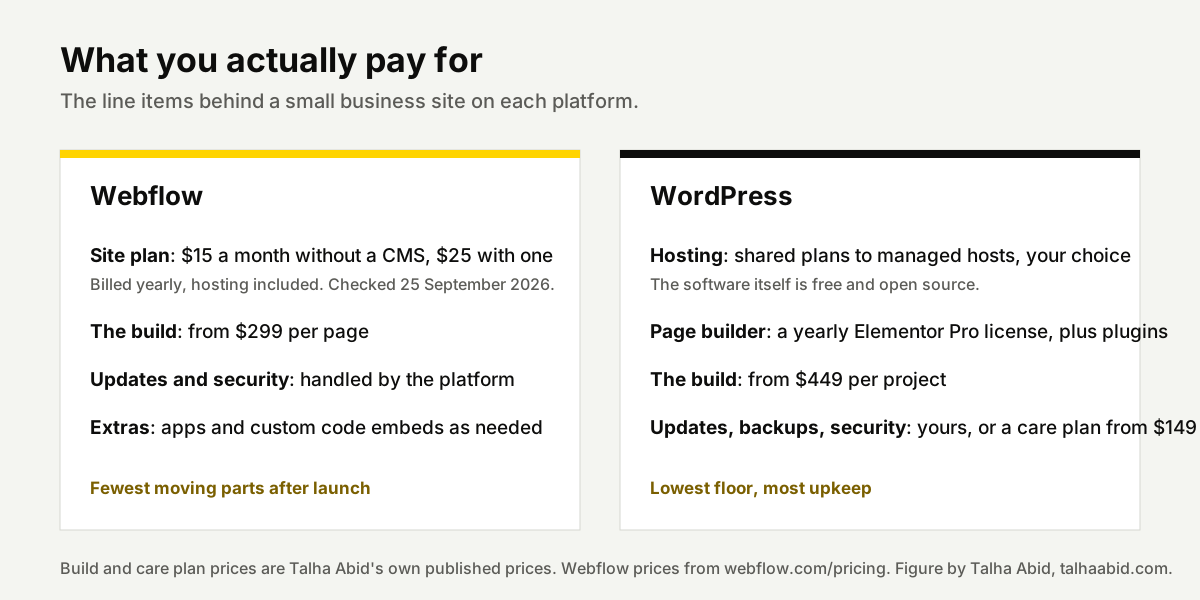
Build cost is similar on both. Design work is design work, whatever the platform.
Which is faster, Webflow or WordPress?
Webflow sites are fast by default. Hosting runs on a global CDN, the generated code is clean, and there is no plugin stack to slow pages down.
A Webflow site gets slow when the design itself is heavy: huge images, autoplay video, or too many scroll animations. I build interactions with restraint for that reason.
WordPress can be as fast, but someone has to do the work. That means good hosting, caching, image optimization and discipline about plugins. Most slow WordPress sites I am asked to fix got slow from what was installed after launch. The core software was rarely the cause.
If speed matters and nobody on your team will look after it, Webflow is the safer choice.
Which is better for SEO?
Both rank fine. Google does not care which builder produced the HTML. For real-user speed data by platform rather than my word for it, HTTP Archive's Core Web Vitals Technology Report tracks Webflow and WordPress side by side.
Webflow gives you clean control over titles, meta descriptions, Open Graph tags, canonical tags, 301 redirects and the sitemap without installing anything. Schema markup goes in through a custom code embed.
WordPress needs an SEO plugin for the same control, and the good ones are excellent. If a site needs advanced schema on every post type, thousands of programmatic pages, or complex redirect rules, WordPress with the right plugin is more flexible.
For a local business with 10 to 30 pages and a blog, where you rank comes down to the content, the page speed and your links.
Which is easier to edit after launch?
Webflow gives content editors a restricted view. They can change text, swap images and publish blog posts, and they cannot break the layout. That is its biggest strength for small teams. Webflow's pricing page sets the rules for editor seats, and they have changed more than once, so check who needs a login and what each seat costs before you commit.
WordPress with Elementor or Divi lets the owner change anything, including things they should leave alone. That is how layouts drift over time. It is more powerful and easier to break.
If the person editing the site is a marketer or an office manager, I lean Webflow. If it is someone technical who wants full control, WordPress will feel less limiting.
How much maintenance does each platform need?
Webflow: nothing to update. There are no plugins, no PHP versions and no security patches for you to apply. The platform handles hosting, SSL and backups.
WordPress: core, theme and plugin updates arrive constantly. You also need off-site backups and basic security hardening. Skip them for long enough and the site eventually breaks or gets hacked.
WordPress itself is solid. Every plugin you add is code from a different author, and all of it has to stay current. Either you do that work, or you pay someone to do it.
Which is better for ecommerce?
Webflow Ecommerce works for a small catalog, but it is not the platform's strength.
WordPress with WooCommerce handles large catalogs, subscriptions, bookings and custom checkout logic. The price is more maintenance, because a store adds more plugins and more that can break.
For a business where the store is the whole company, I usually recommend neither and move the client to Shopify.
Can you switch between Webflow and WordPress later?
Yes. Both directions are routine work for me.
I move WordPress sites to Webflow for teams that want to stop maintaining a stack. I move Webflow sites to WordPress when they need WooCommerce or a plugin feature.
One thing to know before you choose: Webflow hosting stays with Webflow. You can export the HTML and CSS, but CMS content and forms do not come along in the export. A WordPress site can be copied to any host whenever you like.
Whichever way you go, the redirect map is what protects your traffic. Every old URL needs a 301 redirect to its new address, which is what Google's redirect documentation recommends for a permanent move. My website migration service covers that, and my guide to website redesign cost explains the process.
Which platform should your business pick?
- Service business with a marketing site and a blog: Webflow.
- Agency or startup that ships landing pages every week: Webflow.
- Store with more than a handful of products: Shopify.
- Membership site, directory or anything plugin-driven: WordPress.
- Tightest budget with a technical owner: WordPress on low-cost hosting.
- Existing WordPress site that works but looks dated: stay on WordPress and redesign it. Moving platforms only makes sense when the platform is the problem.
- Lead-generation funnels with a CRM and text follow-up behind them: neither. That is GoHighLevel work, and my GoHighLevel pricing guide covers what it costs.
If you are not sure, send me the current site and what you want it to do. I will tell you which platform fits before I quote anything. See Webflow development or WordPress development.
Frequently asked questions
Is Webflow good for blogging?
Yes, on a plan that includes the CMS. You create a blog collection, design the post template once, and every new post follows it. Writers publish from the editing view without touching the design. Webflow's pricing page lists a CMS item limit for each plan, so check the limit if you publish at volume. For a newsroom with many authors and editorial workflows, WordPress is still the stronger tool.
Can I move my WordPress site to Webflow without losing rankings?
Yes, if the move is planned. I export the list of ranking pages from Search Console, keep the same URLs where Webflow allows it, and set a 301 redirect for every URL that changes. Titles, descriptions and content that rank are carried over as they are. After launch I resubmit the sitemap and watch Search Console for a month to catch errors early.
Do I own my website on Webflow?
You own your content, your design and your domain. The hosting is tied to Webflow, and the CMS does not come along if you export the code, so leaving means rebuilding the site on another platform. WordPress is open source and fully portable between hosts. If owning every file matters to you more than convenience does, that counts in favor of WordPress.
How long does a Webflow or WordPress build take?
A Webflow landing page takes me two to four working days from a finished design. Add three to five days if I design it first. A full business site or redesign on either platform usually takes two to four weeks. The biggest variable is how quickly content and approvals come back from your side. The platform makes little difference to the timeline.