
GoHighLevel Missed Call Text Back: Setup, Workflow and Cost
Switch on GoHighLevel Missed Call Text Back under Settings, Phone System, Voice, or build the workflow version with business hours. Register A2P 10DLC first; each text costs under 1.5 cents.
By Talha Abid11 min read
Missed Call Text Back is the GoHighLevel feature that texts a caller when nobody picks up. The built-in version takes two minutes to switch on. The workflow version takes an hour and gives you business hours, a follow-up, and a stop when the lead replies. Both depend on one thing most new accounts skip: A2P 10DLC registration, without which the texts never leave.
It is the first automation I build in every GoHighLevel account, because it is the one owners notice. A call rings out while the technician is on a roof, the caller gets a text with a question and a booking link inside the minute, and the lead that would have gone to the next listing stays in the pipeline. Here is how to set it up properly, with the facts checked against HighLevel's help center on 30 October 2026.
Key takeaways
- The built-in toggle lives under Settings, Phone System, Voice. It texts every call that rings out past your timeout, with no business-hours setting and no follow-up.
- The workflow version uses the Call Details trigger, a time window, a Send SMS step, a wait for the reply, and Stop on Response. Build this one if you want control.
- Register for A2P 10DLC first. HighLevel lists one-time registration at $22.50 to $64 and a monthly campaign fee of $1.50 to $10, passed through at cost.
- Each text costs under a cent and a half at HighLevel's published US rates. A hundred missed calls a month costs a few dollars.
- Keep the text under 160 plain characters, ask one question, and include a booking link.
What Missed Call Text Back does
HighLevel's configuration article, updated 7 September 2026, says the feature "automatically sends a text message to a caller" for "calls that go unanswered past your incoming call timeout", and that "Answered calls never trigger a text back". The texts "count toward your phone messaging usage limits", so they are billed like any other outbound SMS.
Two details from the same article matter in practice. The text has to go out from a number that can send SMS: "number pools, call tracking numbers, unverified toll-free numbers" cannot, and if the dialled number is ineligible, "HighLevel automatically selects an eligible sending number" from the account. And the article recommends a ring time of "10 to 20 seconds" before the call counts as missed, which is long enough for a real pickup and short enough that the caller has not hung up and dialled the next company.
Before you start: A2P 10DLC registration
If you text US numbers from a standard ten-digit local number, US carriers require your business to be registered. HighLevel's A2P 10DLC summary, updated 4 September 2026, says "registration is required when a business sends SMS or MMS messages" to US recipients from local numbers, and that toll-free numbers "do not use A2P 10DLC Brand and Campaign registration" because they go through a separate verification.
Unregistered traffic gets filtered, and the failure is silent: the workflow shows the text as sent and the caller never receives it. That is the single most common fault in the accounts I inherit.
HighLevel's fee article, updated 24 September 2026, lists the registration costs at the time of writing. They are passed through "with no markup from HighLevel" and paid to The Campaign Registry.
| Item | Fee listed on 30 October 2026 |
|---|---|
| One-time brand plus campaign registration, sole proprietor | $22.50 |
| One-time registration, low-volume standard brand | $22.50 |
| One-time registration, high-volume standard brand | $64.00 |
| Additional campaign vetting, if required | $15.00 |
| Monthly campaign fee, sole proprietor | $2.00 |
| Monthly campaign fee, standard | $10.00 |
| Monthly campaign fee, low-volume mixed | $1.50 |
The one-time bundle includes a Fast Track review that the article says approves "within 3 business days". In my builds, the time from submission to approved texting has ranged from a few days to several weeks when a form needed correcting, so submit it on day one and build the rest while it clears. The GoHighLevel pricing guide covers where these fees sit next to the plan.
Method one: the built-in toggle
Open the sub-account, then Settings at the bottom left, then Phone System, then the Voice tab. Under "Voicemail & Missed Call Text Back", open the Missed Call Text Back panel, tick "Enable Missed Call Text Back", and customise the message. That is the whole setup, and it is what HighLevel's article describes.
Write the message as a person would. HighLevel's own blog example opens with "sorry we missed your call!" and uses the contact's first name where the system knows it. Mine follow a fixed shape: the business name, one apology, one question, one link, one human name. For example:
Hi, this is Dana at Northside Pest Control. Sorry we missed you. Is this about a new treatment or an existing appointment? Book a time here: [link]
The toggle has three limits the article does not hide. There is no business-hours setting, so a 2 a.m. misdial gets the same text as a 10 a.m. lead. There is no follow-up; for a second message the article tells you to "create and customize the existing recipe in Workflows". And once the text is triggered it goes; a request on HighLevel's ideas board asks for a way to cancel it when the caller rings straight back, which tells you it cannot be cancelled today.
For a one-person business that answers most calls, the toggle is enough. For everyone else, build the workflow.
Method two: the workflow
The workflow does the same job with rules around it. The parts, with the names HighLevel uses in its help center:
- Trigger: Call Details. The trigger article, updated 4 September 2026, lists the filters Call Direction, Call Status, In Number Pool, Custom Disposition and In Phone Number, with statuses such as "busy", "voicemail", "no-answer" and "completed". Set Call Direction to incoming and Call Status to the missed outcomes. An older version of the same article called the trigger Call Status and gave the example "Call Status is 'busy' or 'not answered'", so confirm the label in your builder; the options are the same.
- Time window. In the workflow's settings, HighLevel's settings overview, updated 14 October 2026, describes a Specific Time toggle with a start, an end and the days of the week. Pick Account Timezone, which the article says uses "the timezone set for the entire location", so the window follows the office rather than the caller.
- Send SMS. The first text, written as above. The wait step that follows needs a message before it; HighLevel's wait article says "A Send Email/SMS action must come before the wait step."
- Wait for the reply. The wait action's "The contact to reply" option holds the workflow until the contact answers on the chosen channel, with an optional timeout. I set two hours during the day.
- Second step. If nobody replied, a second text the next morning, limited by the wait action's advanced options: "Resume On" for weekdays and "Resume Between Hours", which the article illustrates with "between 9:00 AM and 5:00 PM on weekdays". If they did reply, an internal notification to the owner and a pipeline stage change.
- Stop on Response. Switch it on in the workflow settings. The article says it ends the workflow "if they respond", which is what stops a lead who has already called back from getting the second text. The separate "Customer Replied" trigger, described in its own article, can start a different workflow from the reply, with filters such as "Contains Phrase" and "Replied to Workflow", if you want the conversation handled by rules too.
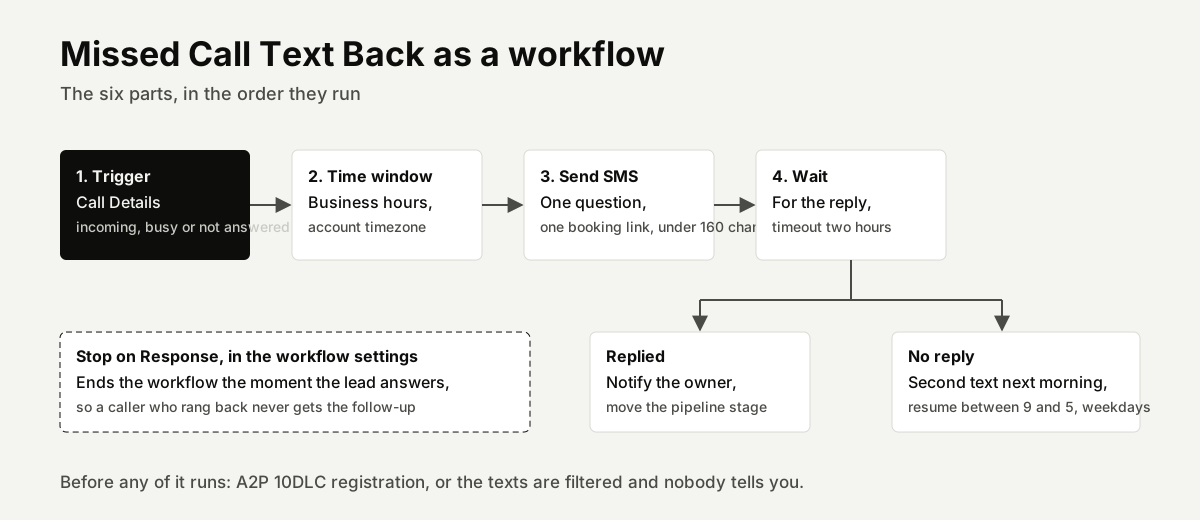
Build it on the recipe HighLevel ships rather than from blank; the recipe already has the trigger and the first text, and you add the window, the wait and the stop.
What the text should say, and how long it can be
Carriers bill by segment, and the segment length depends on the characters you use. Twilio's character limit guide puts a plain-text segment at "160 7-bit characters"; one emoji, curly quote or other Unicode character drops the limit "from 160 to 70", and longer messages are split into segments of "153 characters of data" or "67 Unicode characters". So write in plain characters, keep the first text under 160, and leave the emoji out.
The content rules from my builds: name the business so the caller knows who is texting, apologise once, ask a question the caller can answer in a word, and give the booking link. Do not ask for their name and number; they just called you. And sign it with a person's name, because people reply to people.
What it costs per text
HighLevel's phone system pricing guide, updated 12 October 2026, lists US SMS at "$0.00747" per segment outbound and inbound, described as "A 10% discount is applied to the $0.0083 list price". HighLevel's general pricing guide, updated 29 October 2026, says LC Phone charges "precisely the same amount as Twilio", and Twilio's US price list shows outbound SMS at $0.0083 per segment plus carrier fees. HighLevel's cost calculation article works an example at "$0.0083 + $0.005 = $0.0133, or 1.33 cents" with the carrier fee at its highest.
Take the higher figure. A business that misses 100 calls a month sends 100 texts at 1.33 cents, which is $1.33, receives perhaps 100 replies at under a cent each, and pays the monthly campaign fee of $2 to $10. The automation costs less than one lost job a year. The subscription and the setup are the real costs, and the GoHighLevel expert cost guide covers both.
Opt-outs and the DND rule
A caller who replies STOP must not hear from you again. HighLevel's Do Not Disturb article, updated 28 September 2026, says DND is switched on for a contact when they reply with an opt-out word "(e.g., STOP, UNSUBSCRIBE)" or when the carrier returns certain error codes, and that a permanent DND is lifted only when the contact opts back in or you give support proof of consent. Twilio's default keywords, which LC Phone numbers follow, are STOP, STOPALL, UNSUBSCRIBE, CANCEL, END and QUIT to opt out, START, YES or UNSTOP to opt back in, and HELP or INFO for information.
Test this with a spare phone, not the owner's. A STOP from the owner's number puts their own contact record on DND, and they will wonder why the reminders stopped.
The mistakes I fix most often
- No A2P registration. The texts show as sent and nobody receives them. Check the registration status before you blame the workflow.
- Sending from a tracking number or a pool. The article says those cannot send; make sure the account has one eligible number.
- A text that says nothing. "We missed your call, we'll call you back" gives the caller nothing to do. Ask the question and give the link.
- No Stop on Response. The lead calls back, books, and still gets the follow-up text the next morning.
- No time window. The after-hours text is fine; the second text at 3 a.m. is not.
- No owner notification. The reply arrives in Conversations and nobody is watching it. Add the internal notification, or route the reply to the person who answers the phone.
- Testing from the owner's phone. See the DND rule above.
Testing it
Call the business line from a test phone and let it ring past the timeout. Within a minute the test contact should receive the text, and the conversation should appear under Conversations in the sub-account. Reply with a word and check that the owner notification fires and the pipeline stage moves. Then wait for the follow-up window and confirm the second text does not arrive, because the reply stopped it. Finally, send the test contact a STOP and a START so you have seen both work.
If you would rather have it built
Missed Call Text Back is part of every single-business setup I do, alongside the instant lead reply, appointment reminders and review requests; the GoHighLevel expert page has the fixed prices. If your account exists and only the automations are missing, workflow builds start at $397 and include the A2P filing. The pest control, roofing, HVAC and dental pages show where this workflow sits in each industry's system, and the guide on what GoHighLevel is explains the platform around it.
Frequently asked questions
Does Missed Call Text Back work without A2P 10DLC registration?
Not reliably, for US numbers. Texts from an unregistered local number are filtered by the carriers, and the account shows them as sent. Register first, or use a verified toll-free number, which HighLevel says goes through a separate verification rather than 10DLC.
Does it text every missed call?
The built-in feature texts every incoming call that rings past your timeout, including misdials and existing customers. HighLevel's article says answered calls never trigger it. The workflow version lets you limit it to business hours and skip contacts with a tag, which is how I keep it off known customers who already have a direct number.
Can I switch it off outside business hours?
Not with the built-in toggle; HighLevel's article describes no schedule for it. The workflow version has a time window in its settings and resume-hours options on the wait step, so after-hours calls can get one text and the follow-up waits until morning.
What does each text cost?
HighLevel's phone system pricing guide lists US SMS at $0.00747 a segment, with carrier fees on top; its own worked example comes to 1.33 cents at the highest carrier fee. A hundred missed calls a month is a few dollars, plus the monthly campaign fee of $1.50 to $10.
Can I use my existing business number?
Most of my clients keep their existing number for people to call and buy a GoHighLevel number alongside it, forwarded to the phone they already answer. The text goes out from the GoHighLevel number, which is the registered one. Porting the existing number into GoHighLevel is possible, and it is a separate project with its own waiting time.