
GoHighLevel Website Builder: Templates, Limits and Snapshots
The GoHighLevel website builder handles funnels, multi-page sites, your domain, SEO settings and a blog, with HTML, CSS and JavaScript embeds only. What it can and cannot do, from 65+ builds.
By Talha Abid8 min read
The GoHighLevel website builder is a drag-and-drop page builder inside a GoHighLevel account. It is good enough for most local-business websites and for every funnel, because the forms, calendars and payments on the page belong to the same account as the CRM. It is not a replacement for Webflow or WordPress on a content-heavy site, and it was never meant to be one.
I have built 65+ GoHighLevel sites, funnels and automations since 2019, and the public ones are on my work page. This guide covers what the builder does, where it stops, and how templates and snapshots fit in, with the facts checked against HighLevel's own help center on 30 October 2026.
Key takeaways
- Two kinds of build: funnels, which are page sequences with one goal, and websites, which are multi-page sites with shared navigation. Split testing exists for funnels only.
- Your own domain, SSL, a sitemap, robots.txt, 301 redirects, per-page meta tags and a blog are all built in. Hosting is part of the plan.
- Custom code means HTML, CSS and JavaScript embeds. There is no server-side code and no plugin system.
- Templates are free to use and plentiful; I start sites from blank and funnels from a template.
- A snapshot copies the pages, forms, workflows and calendars into another account. It does not copy contacts, phone numbers or integrations.
What the builder is
Pages are built from sections, rows, columns and elements, which HighLevel's websites overview, updated 8 October 2026, lists as the building blocks. You start from a template or from blank, drag elements into place, and publish. HighLevel's builder page sums up the pitch as "No code. No developers. Just drag, drop and publish."
The same builder makes two things. A funnel is a sequence of pages with one goal, such as a booking page, a confirmation page and an upsell. A website is a set of pages with shared headers, footers and navigation. The overview notes one difference that matters: split testing is "Not available in Websites". If you want to test two versions of a page, build it as a funnel step.
What makes the builder worth using is what sits behind it. A form on the page creates a contact in the CRM. A calendar element books into the account's calendar and fires its reminder workflow. A payment element bills through the connected processor. On Webflow or WordPress, each of those is an integration to set up and maintain.
Templates
HighLevel's builder page advertises "200+ conversion-ready templates" and says "Every design is mobile-optimized". The help center's template library article, updated 12 May 2026, says the library is available "at no extra cost" and covers funnels, websites, emails, forms, surveys, social posts, documents and ads. HighLevel's own announcement from December 2025 reported "over 30,000 templates downloaded in a single week" across funnels, websites, stores, workflows, dashboards, emails, quizzes, blogs, ads, surveys and webinars.
How I use them: funnels start from a template, because a booking or lead-magnet funnel has a standard shape and the template saves the structure. Websites start from blank, because a template site carries sections and styles the business does not need, and removing them takes longer than building the eight sections a local site needs. Either way the copy, the photos and the offer are what make the page work, and no template supplies those.
Domains, SSL and hosting
You connect a domain in Settings under Domains and URL Redirects. HighLevel's domain article, updated 16 October 2026, says a root domain points with an A record and a subdomain with a CNAME or an A record, and that "HighLevel provisions SSL after the domain connects successfully". In my builds the certificate appears within minutes of the DNS change propagating.
Pages are served by HighLevel. There is no separate hosting bill in any of my clients' accounts, and HighLevel's pricing page lists WordPress hosting as a paid add-on only for people who want a WordPress site hosted alongside the account. For a GoHighLevel-built site, the plan fee covers it.
SEO settings: what you control
More than most people expect, and less than a WordPress site with an SEO plugin.
- Per-page title, description and meta tags. Each page has an SEO Meta Data panel in the builder, and HighLevel's custom meta tags article explains how to add any tag, including a noindex tag for pages you want kept out of Google.
- Sitemap. HighLevel's technical SEO guide, published 17 March 2026, says the sitemap is generated from the pages you select and then published for the domain.
- robots.txt and redirects. The same guide says robots.txt is editable per domain and that 301 redirects are set in the domain settings. The redirects matter when you move an old site onto GoHighLevel: every old URL needs a line, which I cover in my website redesign guide.
- Schema. Structured data goes in through the custom code element or the page's head tracking code. The guide mentions support for a long list of schema types; in practice I paste the JSON-LD myself.
- Speed. The builder's pages are heavier than a hand-coded site, and a page loaded with large images and many sections is slow on a phone. Compress every image before upload, keep sections few, and test the live page in PageSpeed Insights. I do not quote a score here because it depends entirely on what goes on the page.
The blog
HighLevel's blog article, updated 9 October 2026, describes the blog as a "built-in publishing system for writing and organizing articles", found under Sites. Each post has its own URL slug, canonical link, SEO title, description, keywords and cover-image alt text. Posts live at a path like yourdomain.com/b/post-slug or on a blog subdomain. Category pages are "not currently supported".
That last line is the limit. The blog is fine for a local business that publishes a few articles a year about its services. It is the wrong home for a publication with categories, authors and hundreds of posts; for that, build the site on Webflow or WordPress and connect GoHighLevel for the forms.
Custom code and what it cannot do
HighLevel's custom code article says you add a code element in the builder and paste custom HTML or JavaScript into it. Site-level tracking code and custom CSS go into the settings, according to the websites overview. That covers analytics tags, chat widgets, embedded calculators, third-party forms and styling tweaks.
What it does not cover is anything that has to run on a server: a database your pages read from, a login area beyond memberships, a pricing engine, or an integration that needs secrets kept out of the browser. Those are built outside the account and connected through the API, which is GoHighLevel developer work rather than builder work. There is also no plugin ecosystem in the WordPress sense; what the builder does not do, you code or you do elsewhere.
Snapshots: how pages move between accounts
A snapshot is how agencies avoid building the same site thirty times. HighLevel's snapshot article, updated 9 October 2026, calls snapshots "reusable templates that capture selected configuration assets". It lists what a snapshot copies and what it leaves behind.
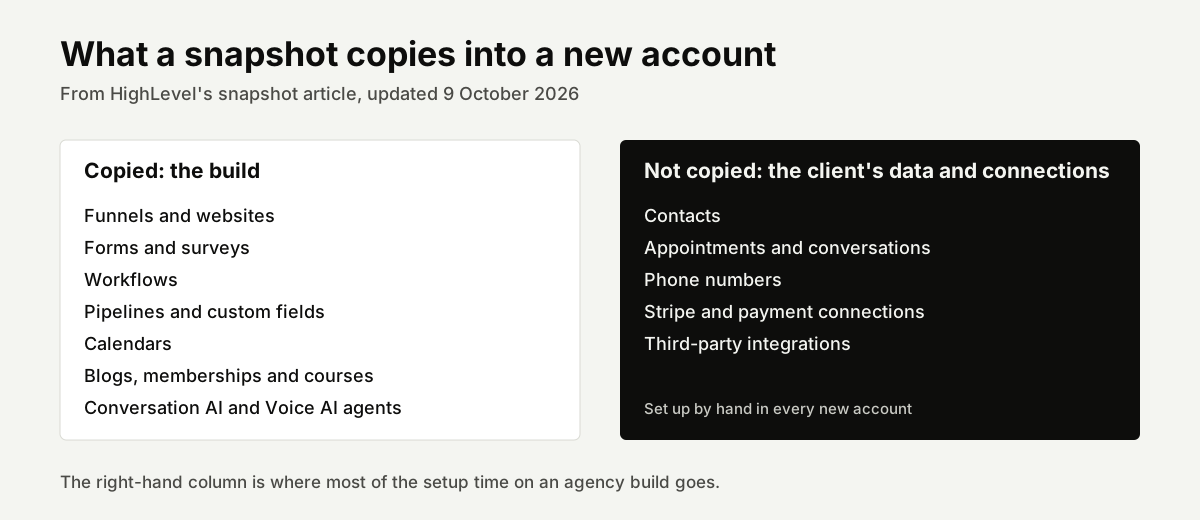
Copied: funnels and websites, forms, workflows, pipelines, custom fields, calendars, blogs, memberships, and Conversation AI and Voice AI agents. Not copied: contacts, appointments, conversations, phone numbers, Stripe connections and other integrations. In practice that means a snapshot gives a new client account the whole system in minutes, and then someone connects the domain, buys the phone number, submits the A2P registration, connects payments and imports the contacts. That second list is most of the setup time on an agency build, and it is why snapshot work sits at the top of my price range.
When to build on GoHighLevel, and when not to
Build the site on GoHighLevel when it is a local-business or coaching site of roughly five to fifteen pages whose job is to get a call, a form or a booking, and when the business already runs its CRM there. The native forms and calendars are the whole point, and the site, the funnel and the follow-up live in one place. My pest control, roofing, HVAC, dental and real estate website pages describe those builds.
Build elsewhere and connect GoHighLevel when the site is a store, a publication, a site with a large archive to migrate, or a brand whose design needs more than the builder allows. Shopify for stores, Webflow when the design leads, WordPress when the content leads. The GoHighLevel form and calendar embed on any of them, so the CRM still sees every lead.
If you are weighing the platform itself rather than the builder, my GoHighLevel review covers the whole product, and what GoHighLevel is explains the modules around the builder.
What a GoHighLevel website costs to have built
A GoHighLevel website or funnel from me is part of a fixed-price setup: $497 to $1,500 for one business, which includes the pages, the pipeline, calendars, the phone and email setup and the core workflows, with 30 days of fixes. The price ladder and what moves it are on my GoHighLevel expert page and in the cost guide. If you only want the site and already have the account configured, say so in the contact form and the quote covers the pages alone.
Frequently asked questions
Can GoHighLevel host my website?
Yes. You connect your own domain with an A record or a CNAME, HighLevel provisions the SSL certificate, and the pages are served from the platform as part of your plan. There is no separate hosting fee for a site built in the builder.
Is the GoHighLevel website builder good for SEO?
It gives you the controls that matter: per-page titles and descriptions, custom meta tags, a generated sitemap, an editable robots.txt, 301 redirects and room for schema through custom code. What it does not give you is the speed of a hand-coded site or the depth of a WordPress SEO plugin. A well-built GoHighLevel site ranks for local service terms; a heavy one loads slowly on phones, and that is the usual reason one does not.
Does GoHighLevel have a blog?
Yes, with per-post SEO fields, canonical links and cover images, published under a /b/ path or a blog subdomain. It does not have category pages, so it suits a business that publishes a few service articles rather than a publication.
Can I move my site off GoHighLevel later?
Not by export. There is no tool I know of that turns GoHighLevel pages into Webflow or WordPress pages, so a move means rebuilding the pages on the new platform and redirecting the old URLs. Your contacts and your domain are yours to take; the page layouts are not portable. Plan the platform choice as if it will last.
Do I need a snapshot if I only have one business?
No. Snapshots exist so agencies can load the same build into many client accounts. A single business builds its site once, in its own account, and a snapshot would only be useful as a backup of the configuration.